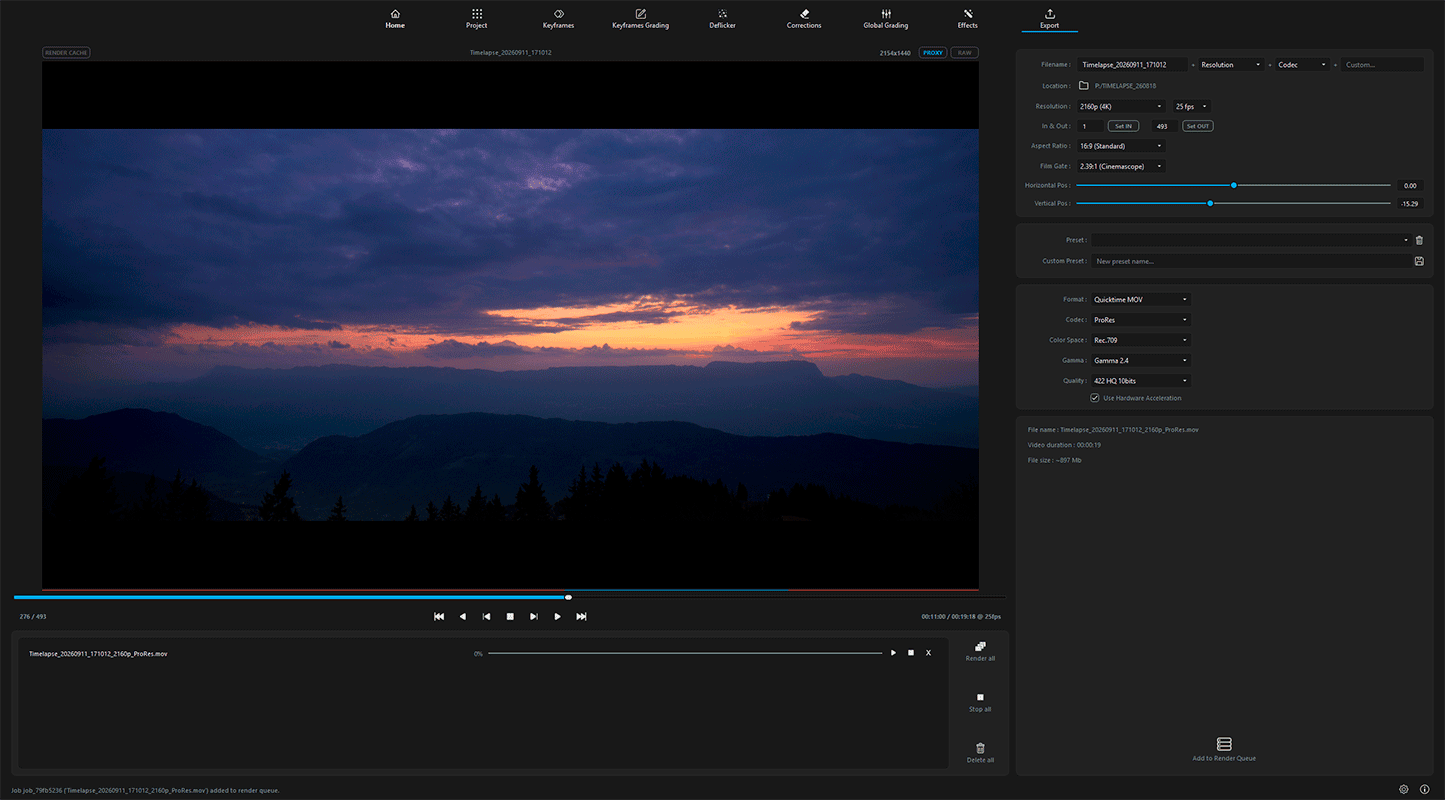
Industry-Standard Master Exports for Every Screen and Pipeline
Output broadcast-ready video files or uncompressed master image sequences tailored for high-end post-production pipelines. With hardware-accelerated encoding, expansive aspect ratios, and comprehensive color management, Lumina delivers pristine visual masters with zero workflow bottlenecks.
Resolution & Frame Rates
Complete spatial and temporal control:
Output anywhere from 720p, 1080p, and 4K up to your camera’s full uncropped native resolution, matched with standard cinematic and broadcast frame rates (24, 25, 30, 50, and 60 fps).
Versatile Aspect Ratios
Multi-platform framing :
Export natively across widescreen, square, and vertical aspect ratios (16:9, 2.39:1, 1.85:1, 4:3, 1:1, 4:5, and 9:16) to target theatrical displays, desktop screens, or mobile feeds.
Cinematic Film Gates
On-screen compositional guides:
Toggle standard theatrical and broadcast overlays (16:9, 2.39:1, 1.85:1) to frame your shots accurately and protect essential visual elements within delivery margins.
In/Out Point Trimming
Precision range selection:
Define exact In and Out markers on the timeline to render specific sequence cuts or trim heads and tails without modifying your underlying project.
Master Image Sequences
Uncompressed archive standards :
Export pristine frame-by-frame sequences in PNG, 16-bit uncompressed TIFF, or 32-bit float OpenEXR (.EXR) for seamless integration into VFX and grading suites.
Professional Video Codecs
Web and master formats:
Render directly to professional post-production codecs—including Apple ProRes (422 10-bit and 4444 12-bit) and Avid DNxHR—or high-efficiency H.264 and H.265 (HEVC) files.
Color Space & Gamma Management
Color-accurate output:
Deliver with precise color science across Rec.709, sRGB, wide-gamut Rec.2020, and Scene-Linear color spaces, paired with Gamma 2.2, Gamma 2.4, or Linear transfer functions.
Hardware Acceleration
Maximum throughput rendering:
Offload encoding pipelines directly to dedicated GPU hardware to eliminate rendering bottlenecks and slash export times.
Batch Render Queue
Automated background processing:
Stack multiple sequence exports with distinct codecs, resolutions, and output destinations into an automated queue that renders sequentially.
Custom Export Presets
One-click delivery profiles:
Save recurring combinations of resolution, codec, color space, and frame rate as reusable presets to standardize deliverables across your client projects.